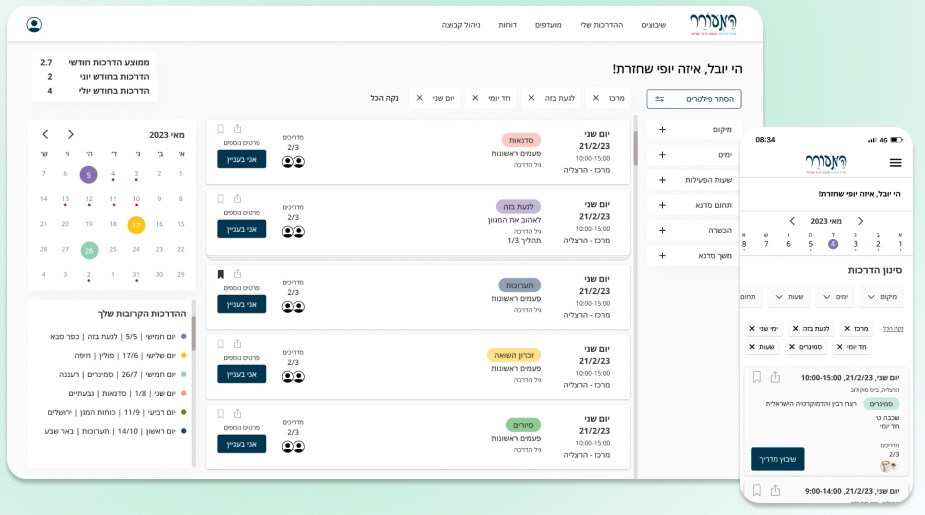
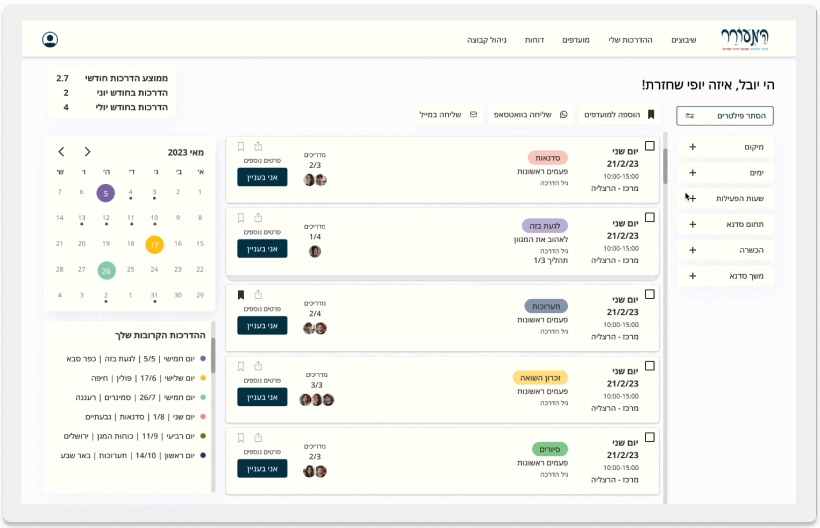
Hundreds of workshops a month, 500+ guides, one Google Sheet. I designed the system that replaced it, for guides, team leads and the scheduling manager.
ClientHaMeorer education center
Year · Duration2023 · 3 months to handoff, then QA on the build
PlatformB2B SaaS, desktop + mobile web
My roleSole product designer: research, UX, UI, design language
TeamMe, the client’s scheduling manager, an external PM + developer
Problem
500+ guides and hundreds of monthly workshops were run from Google Sheets and WhatsApp. Errors, lost rows, last-minute cancellations.
What I did
Interviewed all three roles, mapped the real assignment flow, and designed one system with a view for each role.
Key decision
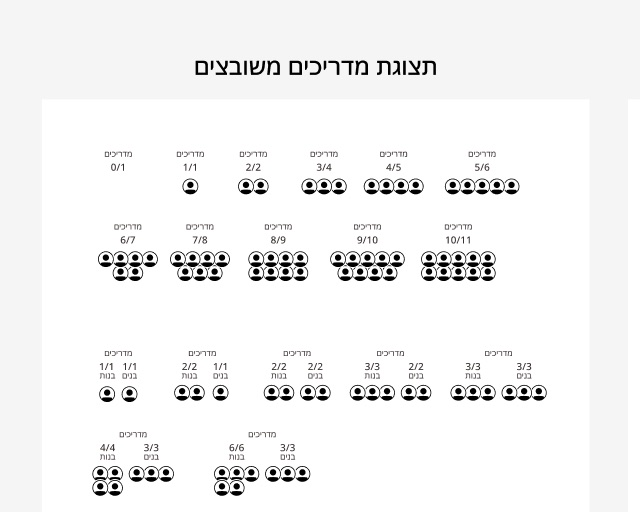
Make sign-ups visible to everyone: seats and faces on every workshop, so coverage stops being a guess.
Outcome
Used by about 500 guides. The hours coordinators got back went into closing more workshops, training more guides and keeping clients.
Context
The organization
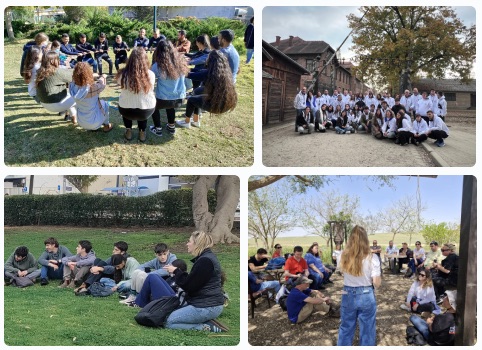
HaMeorer is an educational organization that operates a wide range of workshops, lectures, journeys, and seminars across Israel, working with both formal and informal education systems as well as with the security sector.
The problem
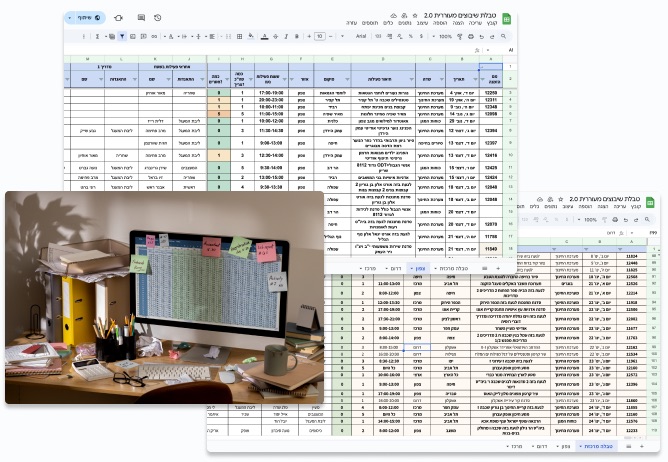
Managing hundreds of workshops and hundreds of guides was handled through Google Sheets, WhatsApp messages, and scattered tables. This fragmented workflow created confusion, errors, and an overwhelming administrative load on managers.
HaMeorer in the field
How it worked before
Human errorsDuplicate or missing workshops.
Data lossDue to filters or accidental deletions.
High manual workloadConstantly updating the sheet and the team leaders.
No visibilityInto upcoming shortages, leading to last-minute workshop cancellations with clients.
The shared scheduling sheet
Research
I interviewed 5 people across all three roles, and went through the shared sheet with them to see how assignments really happen. Three roles, three different needs:
SM
Scheduling manager
1 person · The challenge of managing it all
Needs visibility, control, and the ability to analyze assignment data.
About this role
Oversees hundreds of workshops each month, ensuring every session has enough assigned guides and coordinating closely with team leaders. Handles data transfer to accounting for accurate payments, manages updates and cancellations, and distributes the relevant workshop materials to each guide.
“I had to cancel three workshops this month at the last minute because I realized there weren’t enough guides.”
“I can’t provide my managers with reliable activity data, neither looking back nor planning ahead.”
“Most of my time goes into fixing and updating the Excel sheet.”
TL
Team leads
15+ people · Coordinating chaos on the ground
Need to monitor activities, verify assignments, and track performance.
About this role
Manages 50–150 guides, reviewing the main schedule and regularly sharing relevant workshops with them via WhatsApp. Personally follows up with guides to ensure participation and full coverage, oversees workshop preparation and execution, and distributes training materials. With a deep understanding of each guide’s skills and limitations, helps match the right people to the right workshops.
“I constantly have to chase guides to get their responses.”
“Workshops are scheduled about two months in advance, but guides don’t mark them in their calendars and end up forgetting.”
“If a workshop disappears from the shared sheet, it’s gone. I have no way to know that something has changed.”
G
Guides
500+ people · The face of the organization
Need to quickly browse open workshops relevant to their skills and self-assign easily.
About this role
Facilitates workshops in the field and undergoes special training for different content areas. Expected to participate in a set number of workshops each month and arrive independently at each location. As the company’s representative on site, the guide is the face of the organization to clients, responsible for their own training materials and for staying fully up to date with the content of every workshop they lead.
“I receive workshop lists by email and WhatsApp. It’s really messy.”
“It’s hard to sign up from my phone. I need to be at a computer, but I’m usually out in the field.”
“The schedule keeps changing all the time, and it’s hard to keep up.”
Key insight
All three roles were missing the same thing: one live picture of who is going where. The manager couldn’t see shortages, leads couldn’t see changes, guides couldn’t see what fits them. So every screen starts from shared visibility.
Process
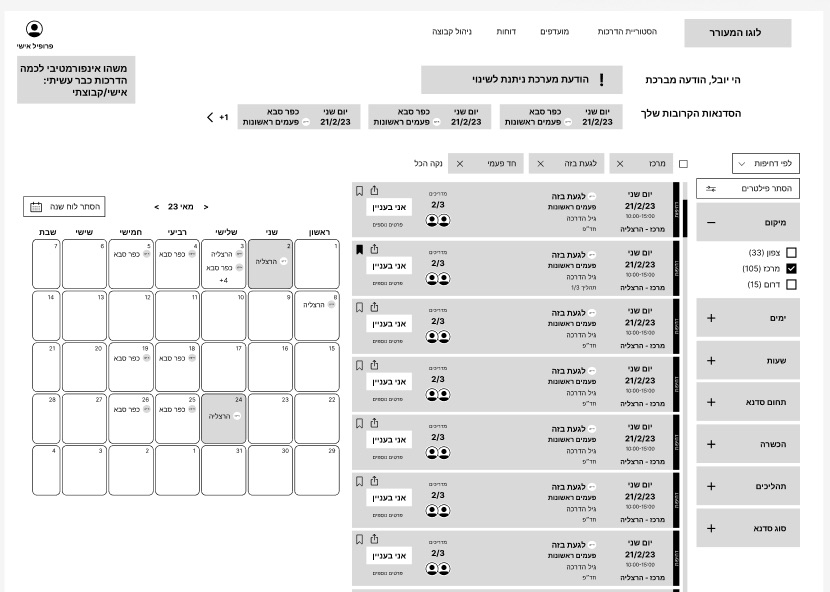
WireframeFinal design
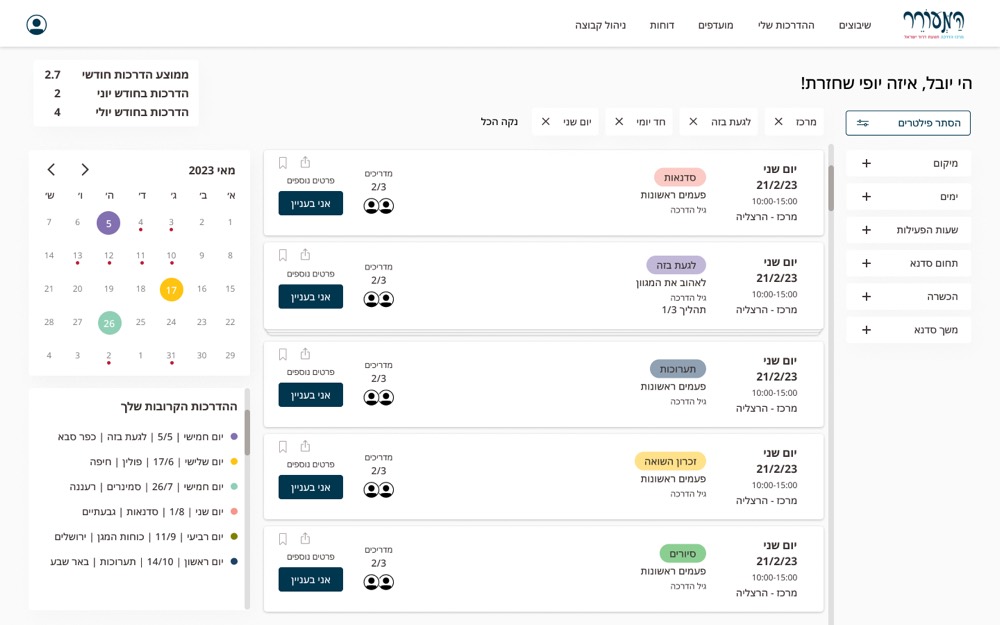
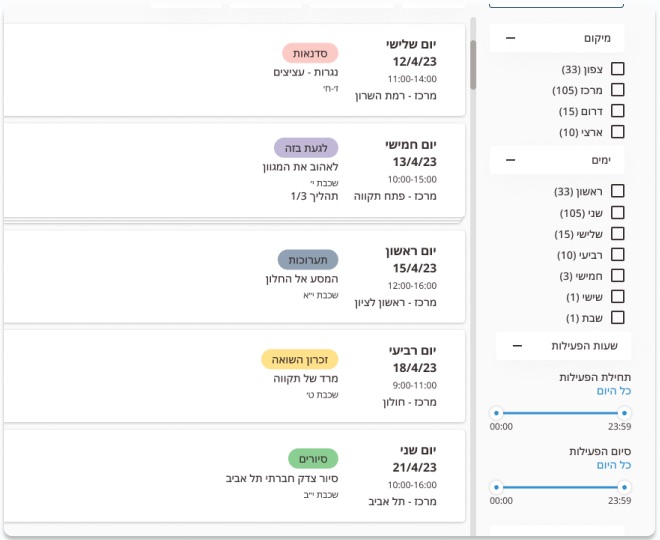
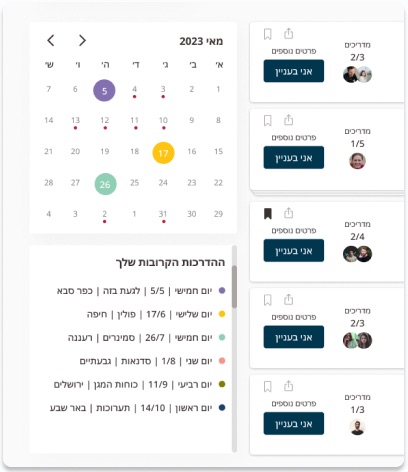
Calendar: a full month grid in the wireframe became a compact month view plus a list of your upcoming workshops, leaving the main column to open workshops.
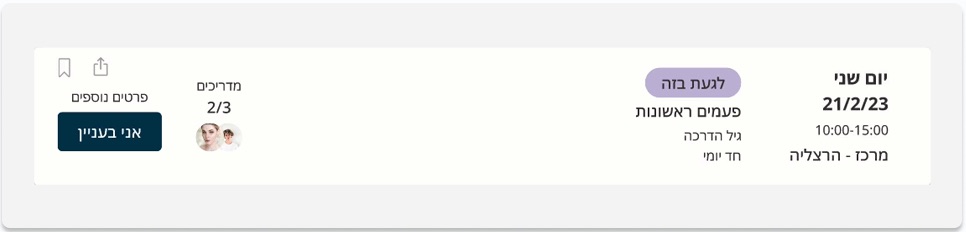
Workshop cards: the structure held from the first wireframe: when, what, seats filled, and one clear action.
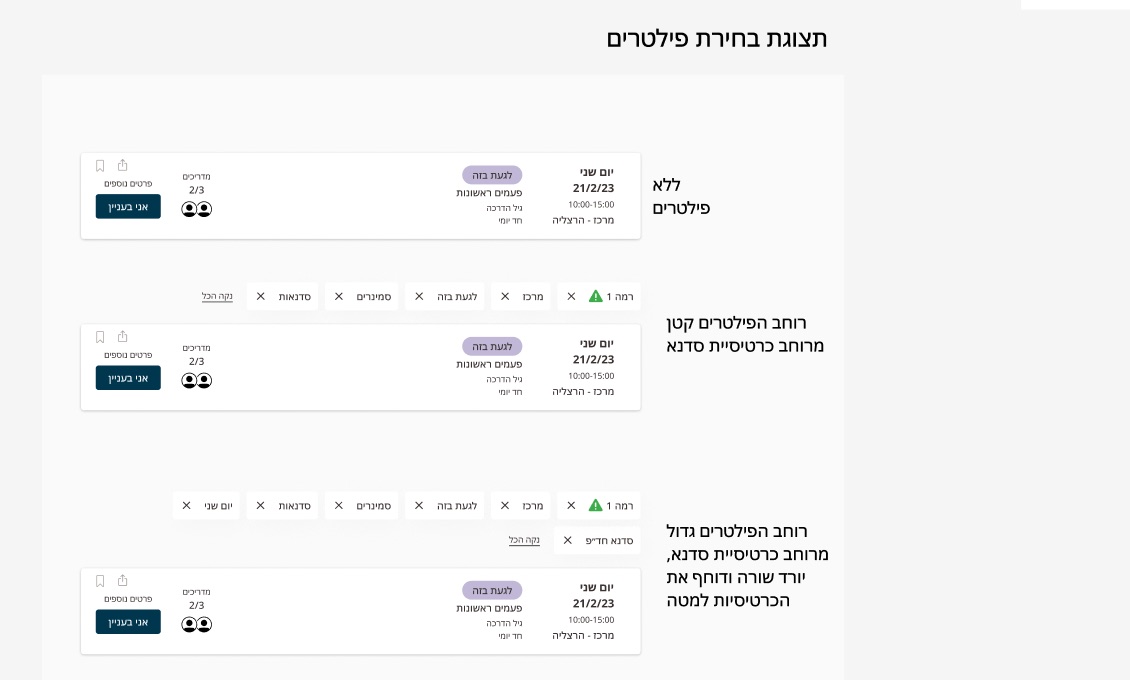
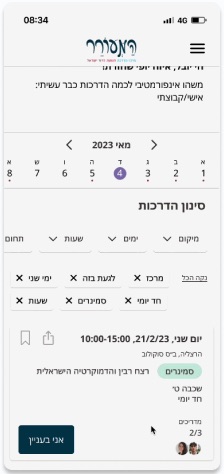
Filters: moved to a dedicated column with counts per option, and saved per guide.
Design language
A small system for dense, bilingual screens: every token and component was defined once and reused on desktop and mobile.
Colour carries meaning
Each workshop type has its own hue and tint, so guides scan the list by type before they read a word.
Base: dark blue for actions, blue for links, warm black for text
One type family, two languages
Noto Sans Hebrew, 13 styles for desktop and mobile, each defined in Hebrew and English side by side.
כותרת 2Heading 2
כתובית 2Subtitle 2
גוף טקסטBody
כיתובCaption
Seat indicator: every count from 0/1 to 10/11, plus a split for girls’ and boys’ groupsFilter chips: behaviour for none, one row, and overflow to a second row
The hardest part: what gets built
I specified the whole system, including a guide profile for better matching, saved workshops and sharing a workshop with a colleague. When development costs came in, the client prioritised, and not everything made the first release. One cut was my design for coordinators to assign guides directly, not only guides signing themselves up. It was added a few months after launch, because the team needed it.
Solutions, by role
GFor guides
Google Sheets made it hard for guides to find relevant workshops.Advanced filtering based on each guide’s preferences, saved for future sessions.
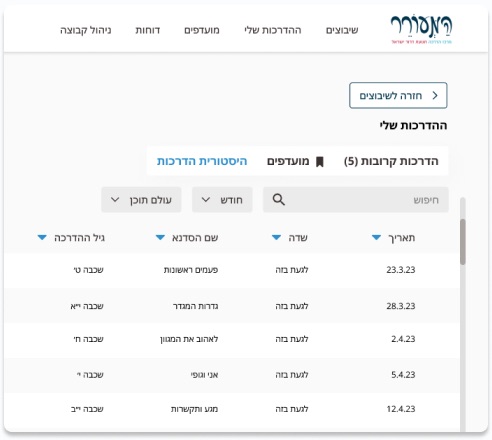
Guides couldn’t keep track of which workshops they needed to review.Ability to save workshops for later review.
Guides often signed up for workshops they weren’t available for, sometimes double-booking the same day.A familiar calendar view that helps guides avoid sign-up mistakes and clearly see their availability.
Signing up from a phone was so hard that guides waited until they reached a computer.A mobile-friendly experience that enables quick, on-the-go workshop sign-ups.
TLFor team leads
Nobody could see who had already signed up.Seats and faces on every card give managers clarity, help team leads ensure coverage, and encourage guides to join confidently. Try it.
יום רביעי12/4/2311:00–14:00מרכז · רמת השרון
סדנאותפעמים ראשונותשכבה ח׳ · חד יומי
מדריכים2/3שע
Workshops that needed a push had no simple way to reach the right guides.Team leads select workshops and share them by WhatsApp or email in one step; guides can invite friends to join.
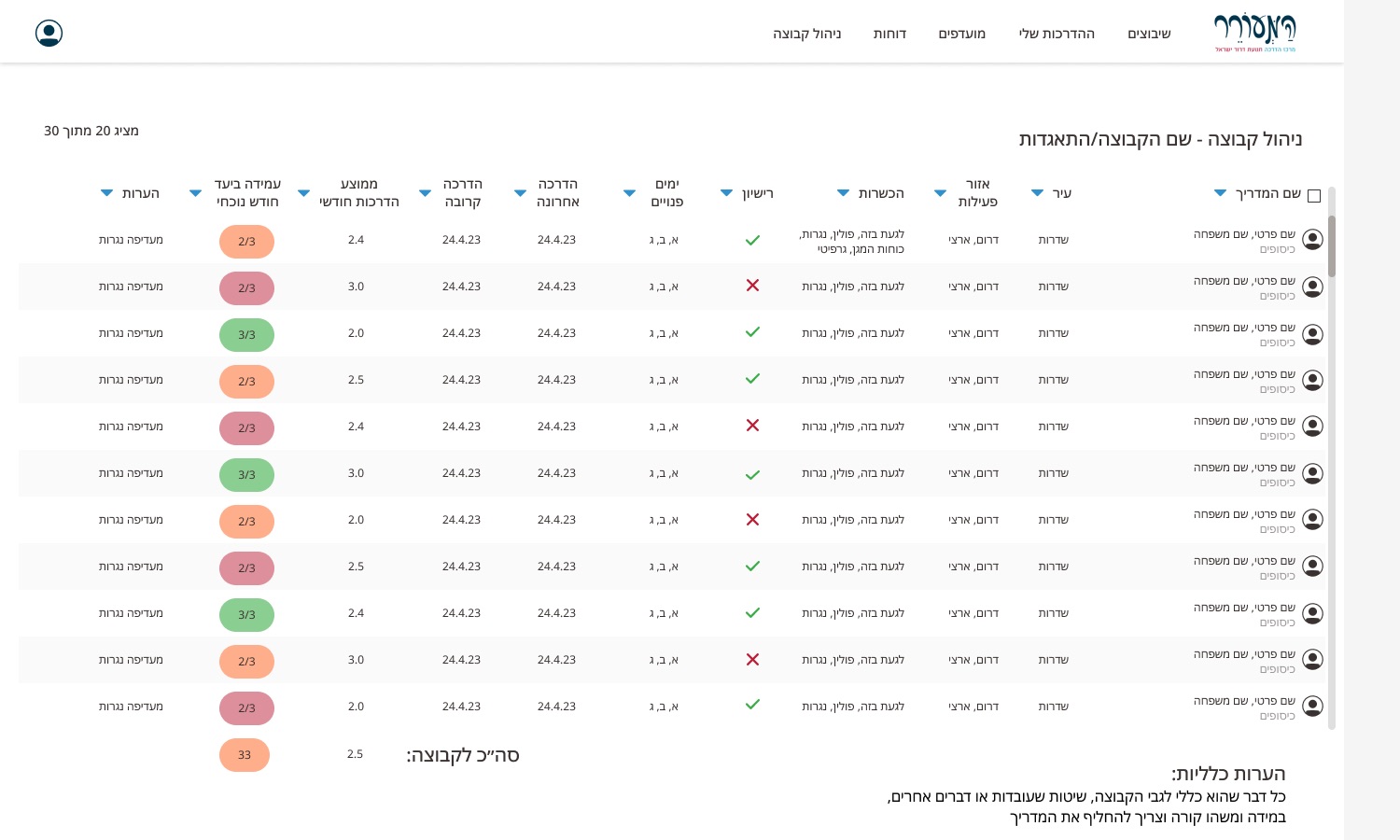
Leads tracked each guide’s monthly commitment in their heads. Designed, may not have shippedA group view with every guide’s qualifications, last and next workshop, and this month’s target, colour-coded.
SMFor the scheduling manager
No reliable history for payroll or for planning ahead.Built-in summary tables and activity overviews that centralize all data and simplify reporting.
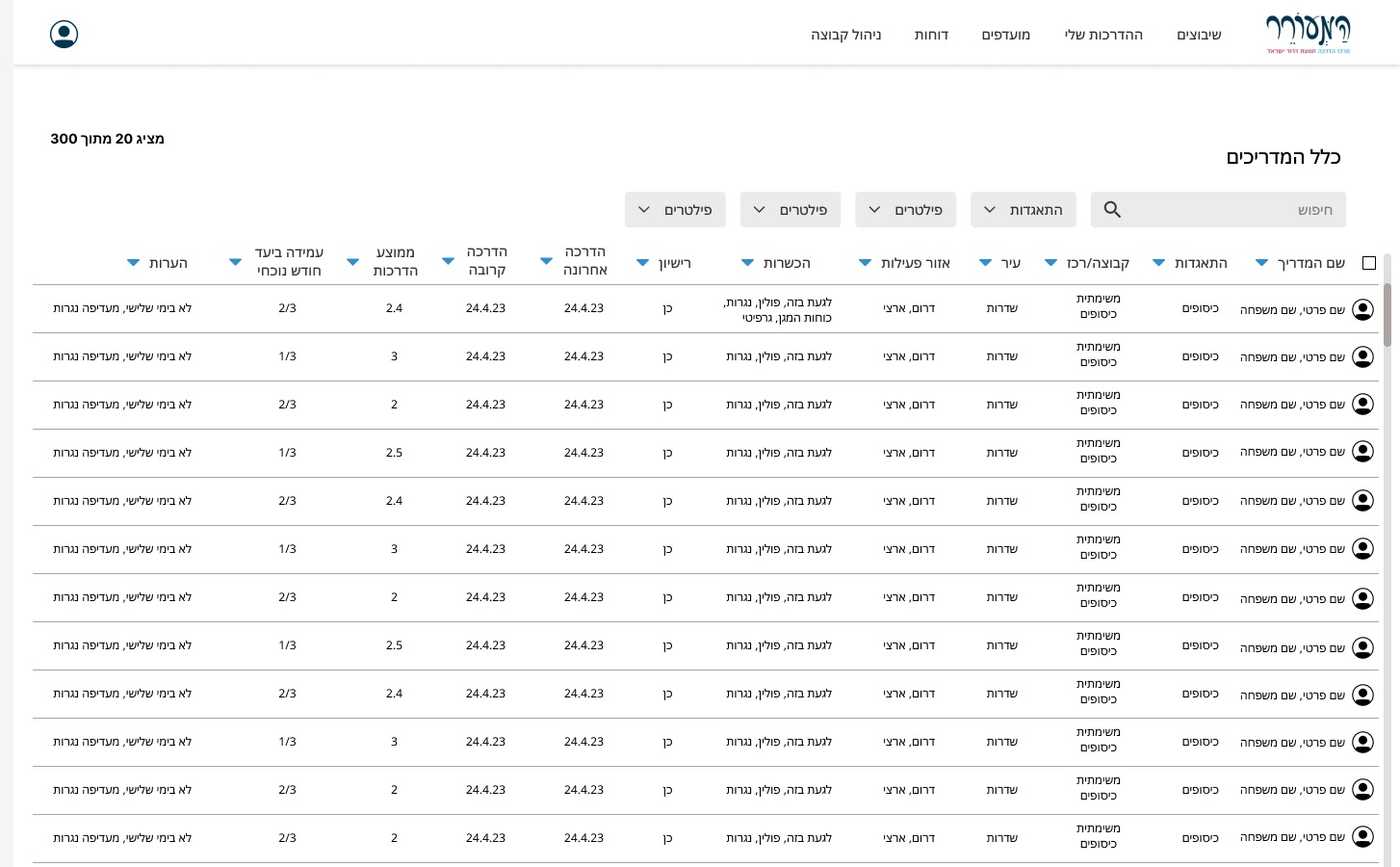
The whole guide pool lived across many sheets.One table of all guides with filters by group, area, qualification and licence.
Flow
From our interview The sign-up flow from finding a workshop to the calendar invite.
Impact
Reduced operational loadBy replacing manual Google Sheets workflows with an automated, centralized system.
Increased workshop coverageThanks to faster, clearer sign-up flows and proactive reminders.
Higher guide engagementThrough visibility, mobile access, and easier coordination with team leads.
Improved reliabilityWith fewer last-minute cancellations and better calendar integration.
Data transparencyFor managers, enabling accurate payroll reporting and meaningful activity insights.
Stronger collaborationBetween scheduling managers, team leads, and guides through shared visibility and real-time updates.
Reflection
My first full-scale product as an independent designer. It taught me project scoping, client collaboration, developer communication, and running a complete UX process from discovery to launch.
What I’d do differently: scope together with the client from the start, and mark in the specification what belongs to the first release and what can wait.
That was the overview. The deep dive adds the context, every quote, the full design language and all nine solutions.